

Welcome
This guide walks you through how to use the Poolside platform effectively. This content is designed to be followed live with members of the Poolside team or a designated trainer from your organization during a scheduled training session. You may also use it as a self-guided resource.Our tools for today's session
Our tools for today's session
Poolside Chat
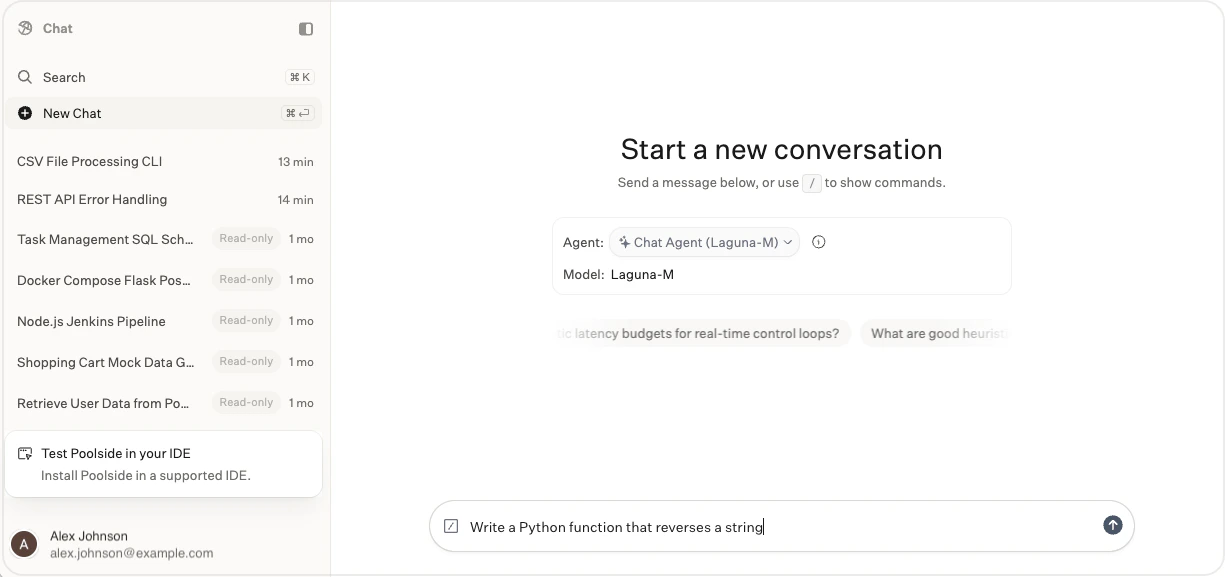
- Purpose: Browser-based chat for development help outside your IDE
- Limitations: Capabilities depend on the selected agent and your deployment configuration
- Strengths: Explains concepts, helps you explore ideas, and drafts summaries, plans, notes, and code
Poolside Assistant in the IDE

- Purpose: Multi-step development tasks in your IDE
- Limitations: Requires access to your local development environment and uses an approval system for tools
- Strengths: Gathers workspace context, reads and writes project files, runs tools, and updates code
- Available in VS Code and Visual Studio
Agenda
Welcome to Poolside
Welcome to Poolside
Prompting with Poolside Chat
Prompting with Poolside Chat
Session #2: Crafting clear, specific prompts
Group session (45 minutes)
We will begin by experimenting with different prompting styles in the Poolside Chat.How to:Open the Poolside Chat in your browser using your organization’s instance URL, for example:https://chat.poolside.yourdomain.comSign in using your organization’s OIDC provider.After signing in, start a new conversation and try the example prompts below.Full Stack Software Engineer
Example Prompts:
- Explain the differences between RESTful APIs and gRPC in terms of performance, ease of use, scalability, and typical use cases.
- Write a Python script that reads a CSV of users, transforms the data, and writes the cleaned results to a new CSV.
- Compare SQL vs NoSQL databases in data modeling, consistency, scalability, and query flexibility.
- Describe the differences between unit, integration, and end-to-end tests.
- Write a React component for a search input box that filters a list of items as the user types.
- Explain concurrency vs parallelism in programming.
Hardware Engineer
Example Prompts:
- Compare using an FPGA vs a microcontroller for implementing a control system.
- Write a Verilog module that acts as a calculator. Include a testbench.
- Describe techniques for reducing power consumption in embedded systems.
- Write an embedded C function for setting, clearing, and toggling specific bits.
- Explain stack vs heap usage in embedded C.
- Write a MATLAB function converting GPS to ECEF coordinates.
See our Prompting Guide and Example Prompts for further reading.
Lunch
Lunch
Group lunch (45 minutes)
Onboarding Poolside Assistant in the IDE
Onboarding Poolside Assistant in the IDE
Session #3: Using Poolside in the IDE
Group session (45 minutes)
Download the Poolside Assistant extension in your preferred IDE.Open Install Poolside Assistant and follow the steps.After installing the extension, open an existing project or create a new project with at least one file.Your project must contain at least one file before you can use Poolside Assistant.
Tasks in Poolside Assistant
Tasks in Poolside Assistant
Poolside API
Poolside API
Session #5: Overview of the Poolside API
Group session (30 minutes)
Poolside provides APIs for model requests and organization automation. For OpenAI-compatible examples, see OpenAI API examples.Use case group discussion
Use case group discussion
Session #6: Exploring use cases for your team
Group session (45 minutes)
During this session, explore how Poolside can be leveraged within your team.Common use cases to consider:- Unit testing: Generate unit tests for existing functions
- Feature development: Construct new features using tasks
- Code summarization: Summarize large files or unfamiliar code
- SDLC automation: Use the Poolside API to augment workflows
- Code documentation: Generate inline or external documentation
- Code translation: Modernize legacy systems
- Code refactoring: Improve structure and maintainability
Hackathon projects
Hackathon projects
Session #7: Build with Poolside
Group session (1 hour)
Break into groups and build a small project using the IDE extension.Suggested ideas:- Remake Conway’s Game of Life in the browser using JavaScript
- Build a meeting room scheduler
- Create a basic AI resource sharing app
- Build an API test harness
- Create a basic LLM chat app with the Poolside API
- Construct a Git repository scanner in Python