

Introduction
Poolside on-premises allows you to deploy Poolside model inference on your own hardware. This is useful for organizations that want to serve models from infrastructure they control, have specific security requirements, must be air-gapped, have limited internet access, or have compliance requirements that prevent them from using cloud-based inference.This page focuses on single-node configurations. For multi-node sizing and validation, contact your Poolside representative.
On-premises hardware options
Poolside offers multiple on-premises hardware options optimized for different model inference scales. Larger HGX-based systems are intended for enterprise-scale usage, while RTX-based workstation configurations are suitable for smaller teams and departmental deployments.Sizing and deployment notes
- Customer-provided hardware (option 1) can start with 4× H200 GPUs; however, capacity must be validated based on your intended workload.
- Scale guidance assumes mixed usage of chat, completion, and agent workloads. Select a model based on your workload and available hardware. Compare current model capabilities in Supported models.
- Actual capacity depends on concurrency levels, model selection, and usage patterns. For concurrent-agent capacity and developer-seat estimates, contact your Poolside account team.
- Poolside validates all on-premises hardware configurations before deployment.
- Review the official power and electrical specifications provided by the hardware vendor before deployment. Certain workstation configurations may require dedicated high-capacity circuits and specialized cooling. Confirm your hosting environment meets the required power and cooling specifications.
Architecture
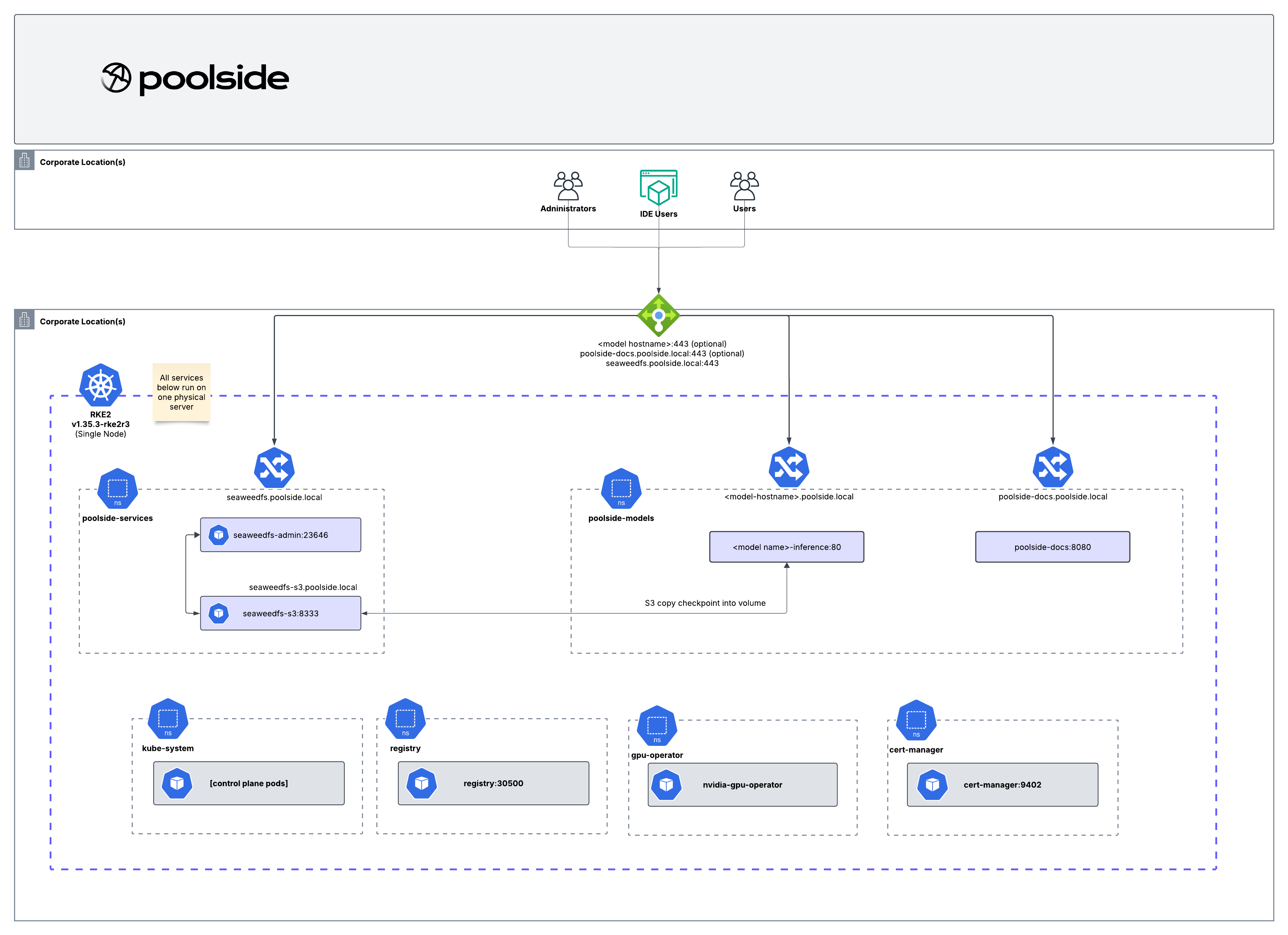
On-premises model inference deployments run on a single RKE2 Kubernetes cluster. While you can configure multiple model replicas for increased throughput, single-node on-premises deployments do not provide high availability against hardware failures. For multi-node sizing and validation, contact your Poolside representative. The on-premises architecture includes:- RKE2 Kubernetes
- Poolside model inference workloads
- S3-compatible object storage for model checkpoints
- A local container registry
cert-managerfor self-signed certificates- NVIDIA GPU Operator for GPU access in RKE2 workloads
- Ingress for model inference endpoints
Installation
Before you begin, complete the on-premises installation prerequisites, including the preparation steps for your host operating system. Poolside on-premises model inference then uses a step-based Terraform deployment process:- Install RKE2 infrastructure.
- Install supporting infrastructure services.
- Upload model checkpoints.
- Deploy model inference and ingress.
Operational responsibilities
For all on-premises deployments, your organization is responsible for:- Infrastructure resilience: Power redundancy, cooling, and physical security
- Data protection: Backup strategies for object storage and model checkpoint artifacts
- System monitoring: Resource utilization, health checks, and alerting infrastructure
- Network security: Firewall rules, network segmentation, and access controls
- Network bandwidth: Sufficient bandwidth for model checkpoint downloads and inference traffic
- Capacity planning: Scaling decisions based on user load and model requirements
- Disaster recovery: Business continuity planning and recovery procedures