

Introduction
Poolside’s partnership with AWS allows customers to benefit from the capacity of running Poolside’s models in Amazon Bedrock. This allows any customer to manage inference in a simplified manner, while benefiting from the fact that they can scale inference to 0.Architecture
The following diagram illustrates the Poolside infrastructure-level architecture after a successful deployment: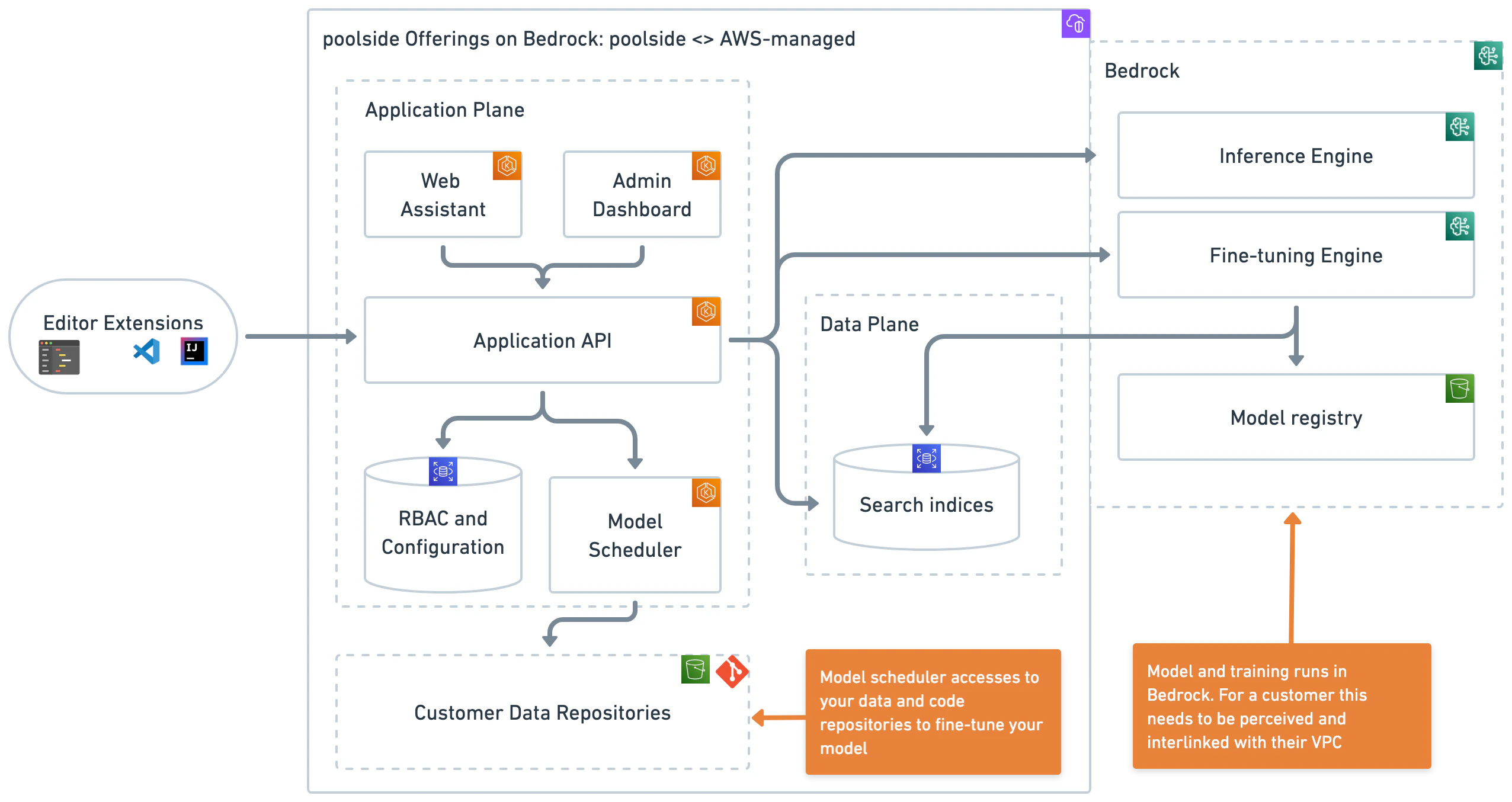
List Existing Models
First, let’s verify what models are currently available in the same region where API is running:Note: Splash will return
No model is available in region us-west2 when a region doesn’t support Poolside’s models.Testing the API
After successfully loading the model we can also test the API to ensure that everything is working properly. First, you need to get the bearer token for your logged in user. We can do this by checking the Splash config file for the token with a ps prefix. Run:Note: Remember to insert your own token as the value for the auth header. Detailed documentation on the Poolside API can be found by navigating to
http://<api.domain.com>/docs